Over the last few weeks, we’ve been working on something a little special here at the HTML5 Doctor.
You’re obviously here because you’re interested in HTML5. You might even be here because the thought of reading the HTML5 spec on the W3C site gives you nightmares. Well, fear not, for you shall be able to sleep easy once again! We’ve just launched the HTML5 glossary.
The purpose of the glossary is simple: we’re going to give you a breakdown of all the elements within the spec in clear, bite-sized chunks.
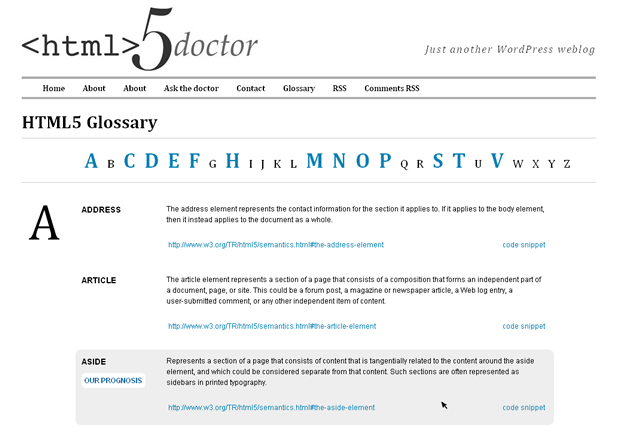
From the screenshot above, you can see that we’ve laid out the page to be as clear as possible (using HTML5, of course). At the top of the page is an alphabetised list of links to individual sections of the glossary. The rest of the page is the list of elements and their descriptions.

I’ve labeled the key points of each entry in the above screenshot:
- Links labeled “Our Prognosis” refer to an article that one of the Doctors has previously published.
- Each entry contains a brief description of what the element represents and its proper (and possibly improper) uses.
- We always include a link to the element’s full description in the official HTML5 spec.
- Code snippets show contextual examples of the element in an HTML document (shown in the screenshot below).
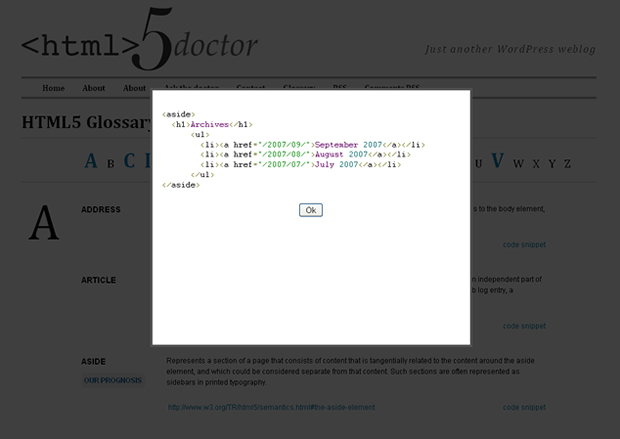
Not every element has a code snippet and “prognosis” link, but we’ll be doing out best to flesh out the glossary with some more examples and elements in the coming weeks.
Be sure to add the glossary to your list of HTML5 resources!
Got a suggestion to help us improve the glossary? Request a missing element or report a problem by leaving a comment below, or head over to the contact page and send us an email.
14 Responses on the article “HTML5 Doctor Glossary”
Sexy! Bravo, gents
This is fantastic! Much simpler than reading through the spec.
At first I thought there were a bunch of elements missing, but then I realised the glossary was only showing changed/added elements to HTML5. It would be nice to be able to see all the elements so that it was a complete HTML5 element list.
Though many of the elements don’t have attributes, the ones that do are difficult to parse the attributes. Possibly presenting the elements in a list format out of the description paragraphs would be easier to find and understand.
[…] This post was mentioned on Twitter by Oli Studholme and html5doctor, ClearType☆Press. ClearType☆Press said: #html5 glossary – http://bit.ly/2r7l0a […]
Friggin’ awesome!
[…] This post was mentioned on Twitter by Web Development News, Conquest Creations. Conquest Creations said: HTML5 Doctor Glossary http://ow.ly/162S5L […]
Nice glossary, but get rid of the light boxes! Accessibility nightmare!
Top work Jack
Maybe you should link to the most recent version of the spec instead of an outdated version? (TR/ is always outdated.)
Why does meter quote from and link to the rendering section rather than the element definition section?
@zcorpan: the meter link is a mistake, thanks for pointing it out. Should now be corrected. Also we’ll take a look at which version of the spec to point to.
@oli, adam & Dr.Tom – thank you.
@thomas – I’ll maybe think about adding all the elements but that’s a pretty big job to take on. If there’s a demand for it then I guess I’ll have no choice :)
@steve – what would you propose instead of a lightbox? We obviously need a way to show code samples and we want to keep the page as clutter free as possible.
@zcorpan – This was something that the Doctors discussed, we’ll look into what you suggested.
This is totally useful guys! Thanks a lot for all this work!
Excellent. Thanks for all the hard work guys, I’ll definitely be checking back on this when I start converting my site to HTML5 in the coming months.
Very nice. Thanks for the hard work and thanks for sharing. Do you mind giving away the code for the gallery?
Join the discussion.