An HTML file is a text document containing HyperText Markup Language. Its tags identify content such as headings, paragraphs, links and images. Open it in a text editor to read or change that source, or use a browser to see the page it describes. The usual filename endings are .html and .htm.
A file named report.html could be a saved webpage, an export from a reporting tool or one you created. Its name cannot establish whether the images and styles it references are included. Work through the small project below to separate the source from the displayed result, then check what needs to travel with it when you share.

What is an HTML file made of?
The file contains characters, not a snapshot of the finished page. A browser parses those characters into a document and displays it. A heading element identifies a heading; a paragraph element identifies a paragraph. Stylesheets can change their appearance, and scripts can introduce programmed behaviour.
Auburn Engineering’s introduction to HTML files describes the basic relationship between text, tags and the browser. Its historical example uses older markup. The complete example below uses the modern HTML doctype and UTF-8 instead.
HTML is the document format; .html is a filename extension used to identify a file. Rename picture.jpg to picture.html and you still have the original image data. Renaming a Word document likewise does not convert its internal format to plain-text HTML.
| File | Typical job | What it does not guarantee |
|---|---|---|
| .html or .htm | Document structure and content | That every referenced resource is included |
| .css | Presentation rules | That its filename alone connects it to the page |
| .js | JavaScript source | That a particular viewer will execute it |
| .png, .jpg or .webp | Image data | That moving the HTML also moves the image |
| .txt | Plain text | That its contents will be treated as HTML |
Open an HTML file to view it or edit it
For a trusted file you want to view, use your browser’s Open File command or the operating system’s Open With option. To change the tags, choose a text or code editor instead. Double-clicking follows the current file association, so it may open either kind of program.
Angle brackets in an editor are expected. A browser showing the heading without its tags is also doing its job. Keep the editor and browser open together: edit, save, then refresh. Make certain both windows refer to the same copy of the file.
On an iPhone, a file attachment and a website address take different routes. Our guide to opening HTML files on iPhone explains Files, compatible viewers and hosted addresses. An email preview is not necessarily a full browser.
Create a complete two-file example
Create a folder named book-swap. Put the following document in index.html. Save it as plain text using UTF-8 encoding. The browser tab will say Book swap notice, while the main visible heading will say Book swap. Those two labels come from different elements.
<!doctype html>
<html lang="en">
<head>
  <meta charset="utf-8">
  <meta name="viewport" content="width=device-width, initial-scale=1">
  <title>Book swap notice</title>
  <link rel="stylesheet" href="notice.css">
</head>
<body>
  <main class="notice">
    <h1>Book swap</h1>
    <p>This is a practice notice, not a real event listing.</p>
    <p><a href="#details">Read the details</a></p>
    <section id="details">
      <h2>Practice details</h2>
      <p>Bring a book you would like someone else to enjoy.</p>
    </section>
    <details>
      <summary>What should I bring?</summary>
      <p>A book in readable condition.</p>
    </details>
  </main>
</body>
</html>
The doctype requests standards mode. Title, encoding, viewport instruction and stylesheet reference belong in the head. The visible notice is in the body. The language attribute identifies English, and the native details element provides an expandable question without a script.
Next, save the following block in a new file called notice.css, inside the same folder. Its stylesheet link is already in the HTML head. This exercise needs no account, build tool or public website.
body {
  margin: 0;
  font: 1.125rem/1.6 system-ui, sans-serif;
  background: #ffffff;
  color: #172331;
}
.notice {
  max-width: 38rem;
  margin: 2rem auto;
  padding: 1rem;
}
h1 { color: #007a78; }
a { color: #005a9c; }
a:focus-visible,
summary:focus-visible {
  outline: 3px solid #b45309;
  outline-offset: 4px;
}
Open index.html in a browser. Expect a teal heading, a readable column of text and a question you can expand. Select Read the details to reach the named section. With a keyboard, use Tab to reach the link and question; Enter activates the link, and Enter or Space toggles the focused summary.
The notice is a demonstration, not an event announcement. Replace its text with details suitable for your actual use. The example contains no forms, external services or JavaScript.
Save the actual source, then refresh
In a Windows text editor, look at the filename and file-type choices under Save As. If the plain-text filter appends .txt, switch to an appropriate all-files option and inspect the saved result. It should be index.html, not index.html.txt. Show filename extensions if they are hidden.
In TextEdit on Mac, choose Format, Make Plain Text before entering the source, then save with the .html ending and choose Use .html if prompted. To edit an existing page as code, enable the option to display HTML files as HTML code rather than formatted text.
The TextEdit instructions hosted by UC Santa Cruz stress plain text and keeping the HTML extension. Their older menu calls the application’s settings Preferences. Menu labels can vary; the important distinction is source code versus a rich-text document.
Modify Book swap to Community book swap in the h1, save and refresh. Nothing changed? Check the address of the open file before clearing caches or rewriting the example. A second copy in Downloads can look just like the one in your project folder.

An HTML file may depend on other files
Our example refers to notice.css without a leading slash. With the document’s ordinary base URL, that points to a sibling resource. If you move the stylesheet into a css folder, update the reference to css/notice.css. Moving files and changing references are separate actions.
The University of Iowa’s HTML-file exercise demonstrates making a directory, saving an HTML file and viewing it through a course server. Its course paths and older XHTML example are specific to that exercise; the useful principle here is the connection between location, saved filename and browser address.
An HTML file can embed styles and scripts, but it can also point to separate files or remote services. Receiving one .html document therefore does not establish that you have a self-contained copy of the page. A saved webpage may arrive with a companion resources folder that needs to stay beside it.
If you add another HTML page, our same-folder linking guide explains the filename-only address and the return link. Use forward slashes in web paths and match the saved filename, including its letter case.
A local file is not automatically a public webpage
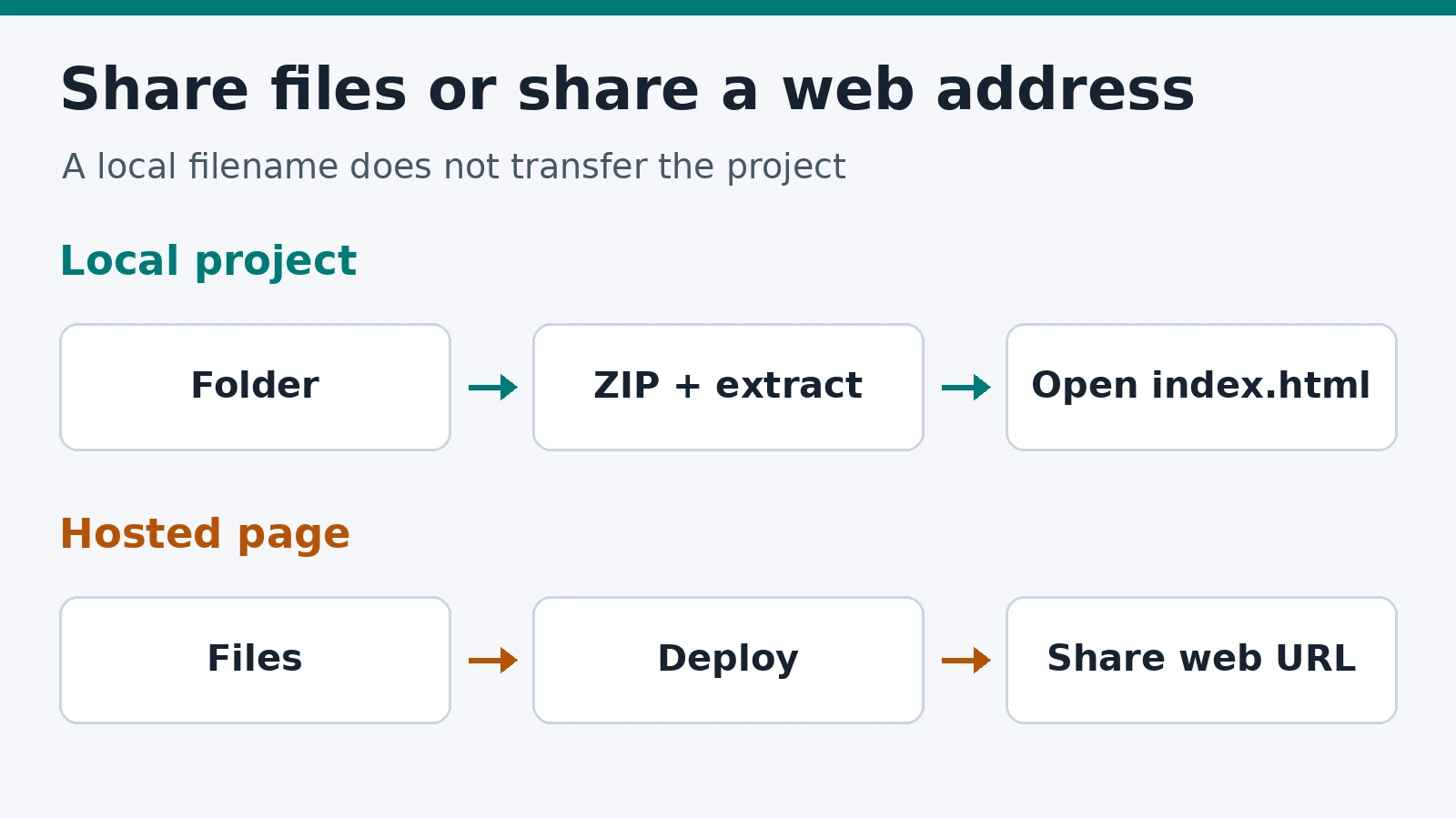
An address beginning file: points to a local resource. Sending that address does not transfer the file from your computer. Share the entire book-swap folder as a ZIP, and ask the recipient to extract it before opening index.html. Test that package in a new folder before sending it. Open the extracted index.html and check for the teal heading with notice.css beside it.
For a public web address, deploy the HTML and every required asset to appropriate hosting. Check the hosted document and its stylesheet afterward. The filename index.html is a common default-document convention, but the server decides what a folder URL actually serves.
A server normally serves HTML with the text/html media type. If a hosted page downloads or shows source unexpectedly, inspect the HTTP response headers as well as its filename. A meta tag cannot substitute for correcting an inappropriate server Content-Type.
Basic text, links and this stylesheet can work from a local file. More complex pages may require a local development server, particularly for module loading or scripted network requests. Keep the browser’s security protections in place while testing.
Troubleshoot an HTML file that opens incorrectly
| Symptom | Check first |
|---|---|
| The browser shows source | Actual extension, opening mode and hosted response type |
| The example has no styling | notice.css exists beside index.html and the link matches |
| Changes do not appear | The file was saved and the browser has the same copy open |
| A picture is missing | The referenced image was included at the expected path |
| The ZIP copy behaves differently | It was extracted with its folder structure preserved |
Try a deliberate fault: rename notice.css to notice-old.css and reload. The document keeps its content but loses that stylesheet. Restore the original filename and reload again. You have separated a missing presentation resource from a missing HTML document.
Treat unfamiliar HTML files as active content
A text-based format is not automatically harmless. Unfamiliar HTML attachments may contain scripts, remote resources, redirects or deceptive sign-in forms. Verify the sender and purpose before opening one. Do not enter credentials or recovery codes just because a local page requests them.
For inspection, choose a trusted editor’s source-only mode instead of automatic preview. Keep private exports out of arbitrary online viewers. The small example here is intentionally free of scripts and remote resources; other HTML files can behave differently.
FAQs and a quick self-check
Are .htm and .html different formats?
Both are common HTML filename endings. Match the ending in links to the actual saved file. Neither ending guarantees valid markup.
Can I use an HTML file offline?
Often, if the needed resources are local and the features work under local-file restrictions. A reference to an online image or service still needs access to it.
Does every webpage have a downloadable .html file?
No. A server can generate HTML for an address that has no .html ending. Its delivered document may also change after scripts run.
You renamed a Word document to note.html. Is it now HTML?
No. Renaming does not convert the underlying document format.
The notice opens, but its heading is no longer teal. What first?
Check the notice.css file and the matching stylesheet reference before rewriting the HTML.
You sent a file address from your laptop. Can a friend open your copy?
That address does not transfer the file. Send the project files or share an appropriately hosted address.